Permissions & Default Permissions
The platform uses a permission system to control which features each user can see and use. Permissions are grouped by area (agents, chat, system settings, etc.) and assigned to user groups.
How Permissions Apply
Each user inherits permissions from the user groups they belong to. The union of all granted permissions across their groups determines what they can do. See User Management for how to manage groups and group membership.
The chat UI, settings pages, and tool cards check these permissions and hide or disable features the user can't access.
Default Permissions for New Users
When a new user is created (e.g. via SSO sign-in), they start with a configurable default permission set. Administrators can edit this default from the User Groups settings.
Editing Defaults
- Navigate to Settings → User Groups — requires the
groups.readandgroups.createpermissions - Click Default permissions at the top of the page (shield icon, next to + Create Group)
- Toggle individual permissions on or off, grouped by category
- Save to apply, or Reset to system defaults to discard customisation
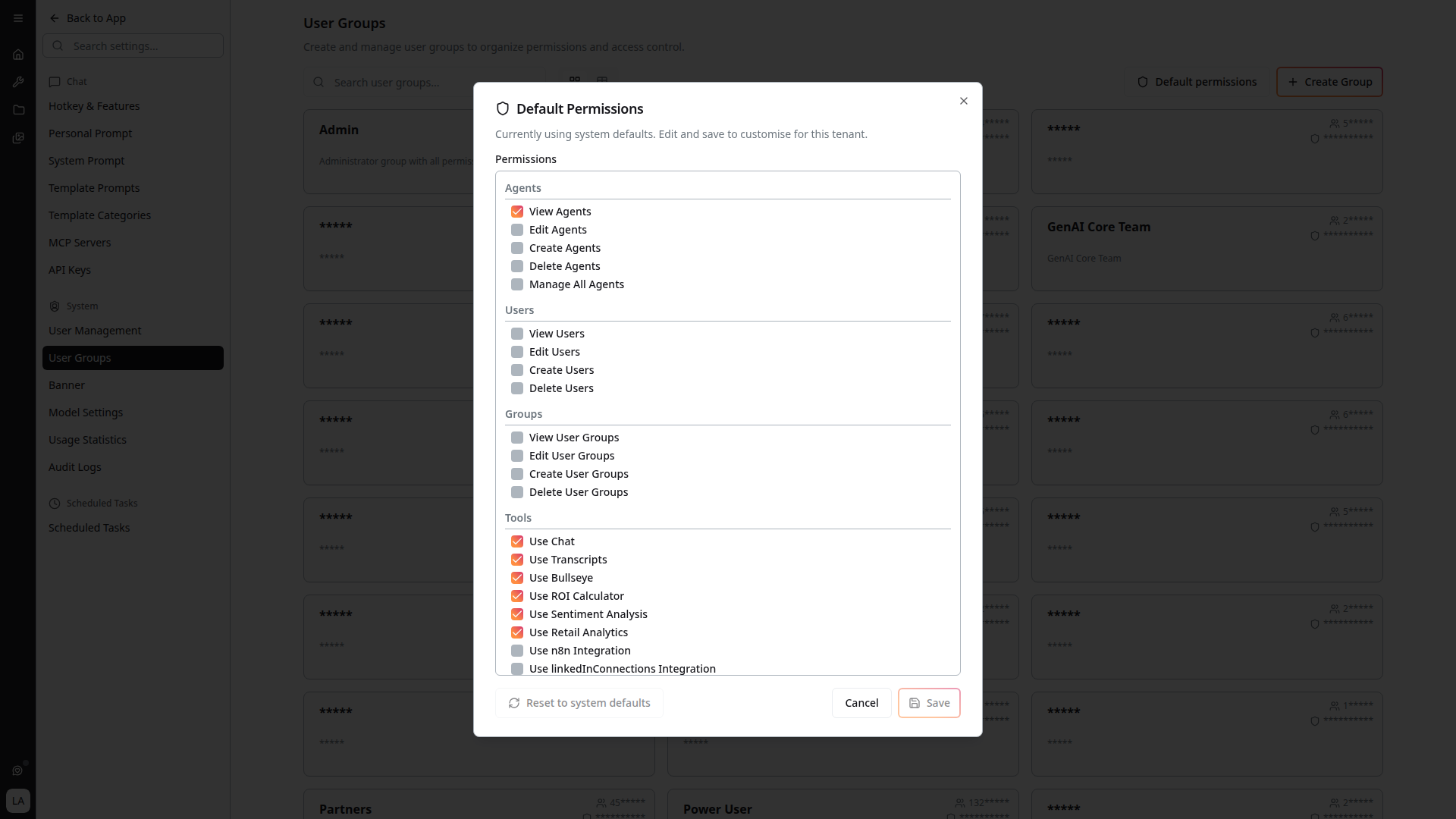
The dialog header confirms the current state — "Currently using system defaults" if you haven't customised it, otherwise it indicates the tenant has its own defaults set.
Existing users are not affected — the default permission set only applies to users who sign up after the change. To update existing users, modify their group memberships in User Management (requires users.read and users.create).
Permission Categories
The Default Permissions dialog organises grants into categories that mirror the platform's feature areas. Each category contains toggleable permissions; the exact set varies by deployment.
- Agents —
View Agents,Edit Agents,Create Agents,Delete Agents,Manage All Agents - Users —
View Users,Edit Users,Create Users,Delete Users - Groups —
View User Groups,Edit User Groups,Create User Groups,Delete User Groups - Tools — Per-tool toggles such as
Use Chat,Use Transcripts,Use Bullseye,Use ROI Calculator,Use Sentiment Analysis,Use Retail Analytics,Use n8n Integration,Use linkedInConnections Integration
Additional category groups (system settings, audit logs, personal prompts, MCP visibility, etc.) appear when their underlying features are present in the deployment.
Permission Inheritance
When evaluating whether a user can do something, the platform checks:
- Permissions granted by the user's group memberships
- Tenant-wide default permissions (only at user creation time)
- Resource-level visibility (e.g. an agent set to private overrides group permissions)
Related
- User Management — create users, manage groups, assign membership
- Audit Logging — see who changed permissions and when